
Every WooCommerce product page on your store is stitched together from PHP template hooks. If you have ever wanted to add a banner, a notice, or a tracking snippet at the very top of a product page, you have probably discovered that no theme option or settings screen offers that slot. You either hack the template file itself or you give up.
That’s what woocommerce_before_single_product is for. It is the action hook that fires at the very top of every single product page, right before the product wrapper is printed. In this guide you will learn where the hook fires, which functions WooCommerce attaches to it by default, and how to add or remove your own code with practical copy-paste examples.
What Is the woocommerce_before_single_product Hook?
woocommerce_before_single_product is a PHP action hook defined in WooCommerce’s content-single-product.php template. An action hook is a named point in the code where WordPress lets any theme or plugin “hook in” and run its own function — without touching the template file itself.
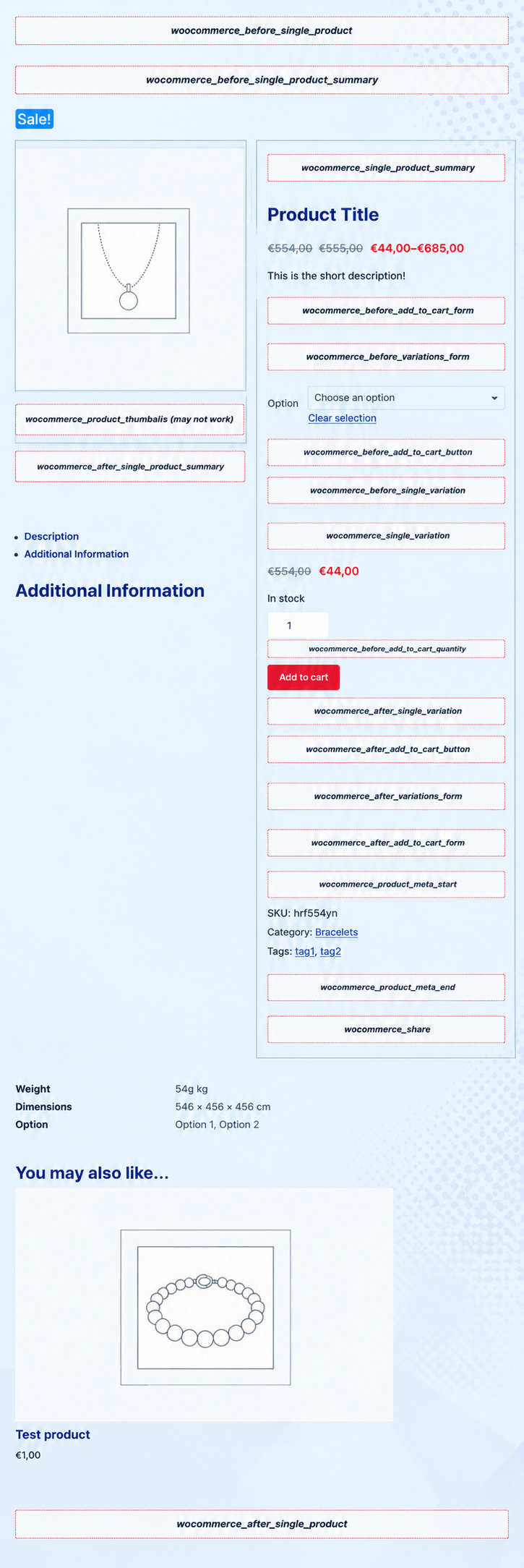
Because this particular hook sits at the very top of the single product template, anything you attach to it renders above the entire product layout: above the product image, above the title, above the price and Add to Cart form. It fires exactly once per product page load, which makes it the cleanest spot for full-width messages and page-level customization.
Where the Hook Fires
Open WooCommerce’s content-single-product.php template and you will find the hook right after the template setup, before the password check and the product wrapper:
<?php

global $product;

/**
 * Hook: woocommerce_before_single_product.
 *
 * @hooked woocommerce_output_all_notices - 10
 */do_action( 'woocommerce_before_single_product' );

if ( post_password_required() ) {
    echo get_the_password_form();
    return;
}
?>
<div id="product-<?php the_ID(); ?>" <?php wc_product_class( '', $product ); ?>>
Three things worth noticing here:
- It fires before the wrapper div. Your output lands outside
div.product, so it spans the full content width — not just one column. - It fires before the password check. The hook runs even on password-protected products, so sensitive output would still be visible. Keep that in mind.
- The template loads it for every product. Whether a visitor arrives from the shop archive, a category page, or a direct link, the hook fires the same way.
Default Actions Hooked to It
Out of the box, WooCommerce attaches exactly one function to this hook, registered in includes/wc-template-hooks.php:
| Function | Priority | What it does |
|---|---|---|
| woocommerce_output_all_notices | 10 | Prints any queued WooCommerce notices (cart messages, errors, confirmations) at the top of the page |
Themes and plugins frequently add their own callbacks here too — for example, breadcrumb plugins and page-builder integrations often hook into this spot to inject wrappers. When debugging unexpected output above a product page, this hook is one of the first places to look.
How to Use the Hook
Attaching your own code takes one add_action() call: the hook name, your callback function, and an optional priority that controls when your function runs relative to others. Place the code in your child theme’s functions.php or a code snippets plugin.
Add a Custom Banner
<?php

add_action( 'woocommerce_before_single_product', 'my_product_banner', 15 );

function my_product_banner() {
    echo '<p class="my-product-banner">Free shipping on all orders over $50!</p>';
}
Priority 15 runs the banner after the default notices (priority 10), so site messages always appear above your banner. Style the banner with a simple CSS rule targeting .my-product-banner.
Show a Low-Stock Notice
Sometimes the output should depend on the product being viewed. Because the hook passes no arguments, grab the global $product object inside your callback:
<?php

add_action( 'woocommerce_before_single_product', 'my_low_stock_notice' );

function my_low_stock_notice() {
    global $product;

    if ( ! $product || $product->get_stock_quantity() > 5 ) {
        return;
    }

    wc_print_notice(
        sprintf( 'Hurry! Only %s left in stock.', $product->get_stock_quantity() ),
        'notice'
    );
}
Here wc_print_notice() reuses WooCommerce’s own notice styling instead of printing raw HTML, so the message automatically matches the rest of the store.
Remove a Default Action
To stop a default function from running, detach it with remove_action(). The priority argument must match the one used when the action was added:
<?php

remove_action( 'woocommerce_before_single_product', 'woocommerce_output_all_notices', 10 );
Tip: Add your hooks in a child theme’s functions.php or a snippets plugin — never in the parent theme or a template copy. Parent theme and plugin updates overwrite both, and your customization disappears silently.
woocommerce_before_single_product vs woocommerce_before_single_product_summary
These two hook names look almost identical, and mixing them up is the most common mistake on this part of the page. They fire in different places and serve different purposes:
| woocommerce_before_single_product | woocommerce_before_single_product_summary | |
|---|---|---|
| Position | Above the entire product wrapper | Inside the wrapper, above the image column |
| Default content | Notices | Sale badge, product image, thumbnails |
| Fires | Once, at the top of the template | Later in the same template |
| Best for | Full-width banners and site-level messages | Visual additions around the product gallery |
A quick way to remember it: the _summary variant belongs to the left column of the product page (image area), while the plain woocommerce_before_single_product spans the whole page. If you need to rework the summary column itself — the title, price, rating, and Add to Cart area — see my woocommerce_single_product_summary hook guide, which maps every function hooked to that section.
FAQs About woocommerce_before_single_product
Where exactly does the hook output appear?
Directly above the div.product wrapper — above both the image column and the summary column, spanning the full content width. Breadcrumbs and shop notices typically sit at or near this level too.
Does the hook receive any arguments?
No. The template calls do_action( 'woocommerce_before_single_product' ) with no arguments. If you need product data inside your callback, read the global $product object as shown in the low-stock example above.
Why doesn’t my code show on the product page?
The usual suspects: the code is in a file that never loads, your theme overrides content-single-product.php and drops the hook, a caching plugin is serving an old page, or the store uses WooCommerce’s newer block-based product templates, which don’t run classic PHP hooks. Clear the cache and test with a default theme first.
Can I add multiple functions to the same hook?
Yes. Hook as many functions as you need and control their execution order with the priority number — lower numbers run first. Two functions sharing the same priority run in the order they were registered.
Conclusion
woocommerce_before_single_product is the highest reachable point on every product page: one default function (notices), no arguments, and a full-width slot above the entire product layout. Attach a banner, detach the notices, or add conditional messages — a single add_action() line in your child theme does all three.
If you would rather have a developer wire up your product pages properly — banners, hooks, custom layouts, and all — hire a WooCommerce developer for a fixed quote, or reach out to me directly with your project details.

