
- Why Hide Checkout Fields for Virtual Products?
- How cart->needs_shipping() Works
- PHP Snippet: Hide Fields When Cart Does Not Need Shipping
- Before and After on the Checkout Page
- Which Fields to Keep
- Edge Cases and Tips
- FAQs About Hiding WooCommerce Checkout Fields
- Does needs_shipping() only check virtual products?
- Will this hide fields for mixed carts?
- Can I still show order notes?
- Does this work with the Checkout block?
- Conclusion
Selling courses, downloads, or memberships? Customers still see company, street, postcode, phone, and order notes on checkout — fields that collect nothing useful when nothing ships. That extra friction costs conversions on otherwise ready-to-buy virtual orders.
That is what WooCommerce hide checkout fields for virtual products solves. With one filter on woocommerce_checkout_fields and WooCommerce’s own cart->needs_shipping() check, you strip address fields the moment the cart needs no shipping — and restore them automatically when a physical product returns. Below: the snippet, before/after screenshots, and edge cases to watch.
Why Hide Checkout Fields for Virtual Products?
Virtual and downloadable products never leave the server. Billing address, postcode, state, and phone rarely affect payment authorization for digital goods — yet every extra required field is another chance to abandon the cart.
- Faster checkout — name and email are enough for delivery and receipts.
- Fewer validation errors — no fake street addresses to satisfy required rules.
- Clearer UX — the form matches what the customer is actually buying.
How cart->needs_shipping() Works
WC()->cart->needs_shipping() is the same helper WooCommerce uses to decide whether to show shipping fields and calculate rates. It returns false when no cart item requires shipping — for example a cart with only virtual or downloadable products, or when you have disabled shipping entirely.
That makes it a better default than manually looping cart items and reading the _virtual meta: WooCommerce keeps the rule in sync with product data, shipping settings, and future product-type changes. Use it as the guard before unsetting fields.
PHP Snippet: Hide Fields When Cart Does Not Need Shipping
Add this to your child theme’s functions.php or a snippets plugin. Keep first name, last name, and email; drop the rest of the billing address block and hide order notes when shipping is not required:
<?php

add_filter( 'woocommerce_checkout_fields', 'remove_virtual_fields' );

function remove_virtual_fields( $fields ) {
   if ( ! WC()->cart->needs_shipping() ) {
      unset($fields['billing']['billing_company']);
      unset($fields['billing']['billing_address_1']);
      unset($fields['billing']['billing_address_2']);
      unset($fields['billing']['billing_city']);
      unset($fields['billing']['billing_postcode']);
      unset($fields['billing']['billing_country']);
      unset($fields['billing']['billing_state']);
      unset($fields['billing']['billing_phone']);
   }
   return $fields;
}
Hook order matters: woocommerce_checkout_fields runs while the checkout form is built, so unsetting keys here removes them from the rendered form without touching saved order data.
Tip: Test with a virtual-only cart and a mixed cart. If payment gates depend on country or postcode, keep
billing_country(and postcode if required) instead of unsetting them.
Before and After on the Checkout Page
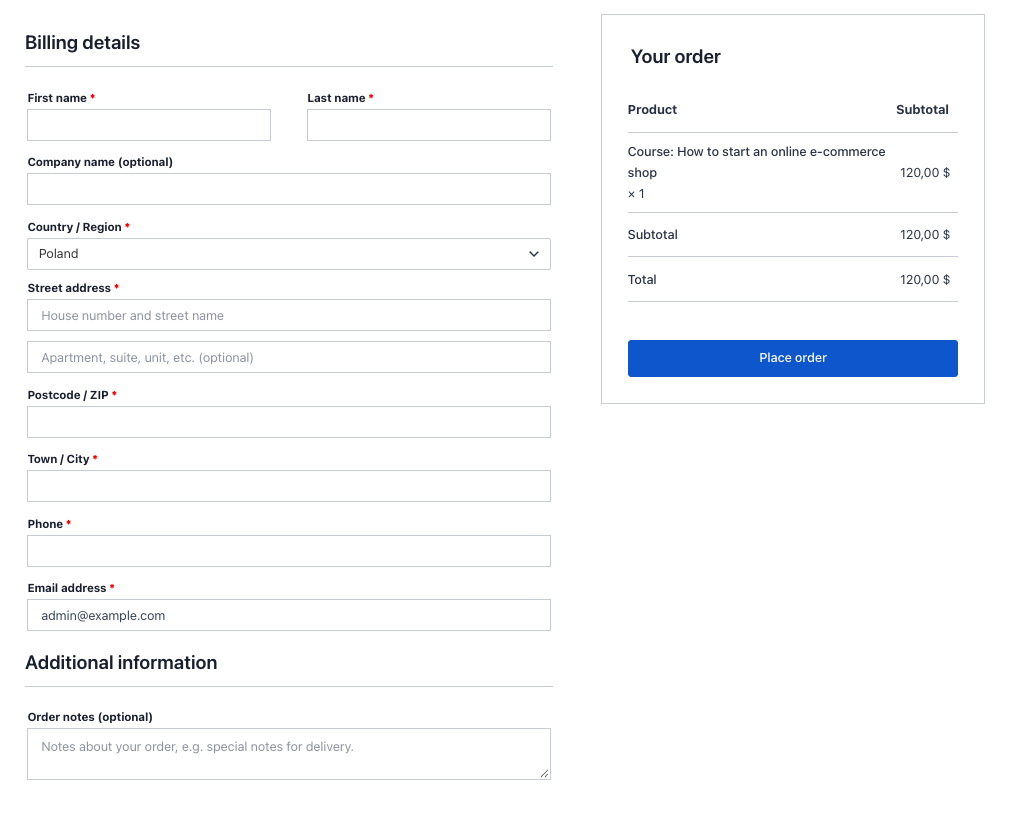
Default checkout with a normal shipping cart — full billing block, address lines, phone, order notes:
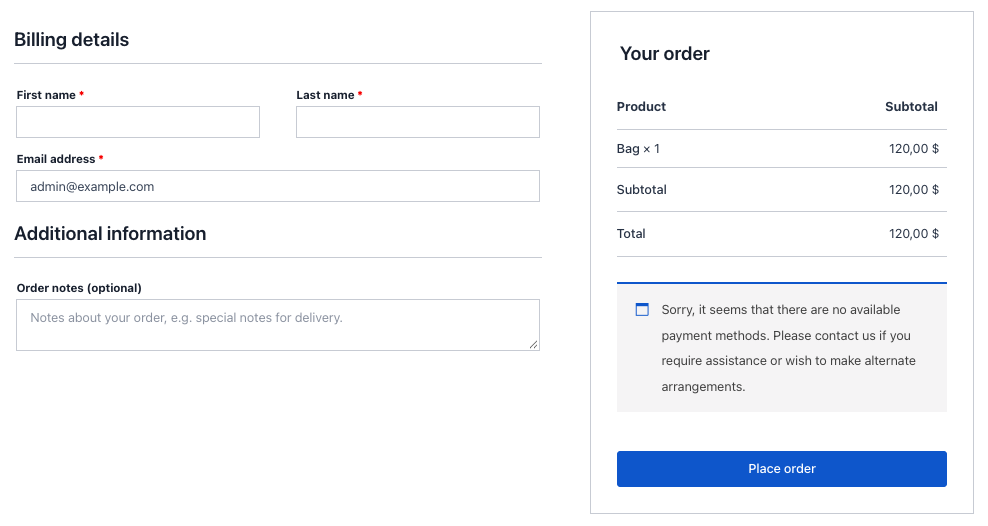
After the snippet, with only virtual products in the cart — name, email, and order summary remain; shipping-related billing fields are gone:
Which Fields to Keep
Minimum viable checkout for digital goods:
- billing_first_name / billing_last_name — receipt and invoice identity.
- billing_email — delivery of download links and license keys.
- billing_country — keep if tax or payment rules need it (optional otherwise).
Safe to remove when needs_shipping() is false: company, address_1, address_2, city, postcode, state, phone, and order notes. Need a new custom field instead? See the woocommerce_form_field() guide for rendering and saving checkout fields properly. For the full field map, read the WooCommerce checkout fields guide.
Edge Cases and Tips
- Mixed carts — one physical product makes
needs_shipping()true again; fields return automatically. No second snippet required. - Shipping disabled store-wide —
needs_shipping()can be false for every cart; confirm that matches how you sell. - Payment plugins — some gateways still read country or postcode. If payments fail, re-enable those two keys only.
- Block checkout — classic
woocommerce_checkout_fieldsfilters apply to the shortcode/classic checkout. Cart/Checkout blocks need block-specific controls or the classic shortcode. - Plugins that rebuild fields — run on a staging copy first; heavy form plugins may re-add fields after your filter.
FAQs About Hiding WooCommerce Checkout Fields
Does needs_shipping() only check virtual products?
It reflects whether the cart needs shipping overall — virtual and downloadable flags, shipping methods, and related settings. That is usually what you want; you do not need a manual loop over _virtual meta for the common case.
Will this hide fields for mixed carts?
No. If any item requires shipping, needs_shipping() is true and all fields stay visible.
Can I still show order notes?
Yes — delete the woocommerce_enable_order_notes_field line from the snippet, or keep notes only for physical orders with an extra condition.
Does this work with the Checkout block?
The filter targets the classic checkout form. Use the Cart/Checkout blocks only if you handle field visibility through block editor settings or separate block hooks.
Conclusion
Hiding checkout fields for virtual products is a small change with a direct payoff: shorter forms for digital buyers, automatic fallback when physical items enter the cart, and no custom meta loops when you lean on WC()->cart->needs_shipping(). Drop the snippet into your child theme, test both cart states, and keep country or postcode only if a gateway demands them.
Building more checkout logic or custom fields? Hire an expert WooCommerce developer — or reach out to me directly.

