
- Why Create Custom Routes in WordPress?
- How WordPress Routing Works
- Method 1: Rewrite Rules and Query Variables
- Method 2: Load a Custom Template
- Method 3: Use a Router Plugin
- When to Use a Custom Post Type Instead
- FAQs About Creating Custom Routes in WordPress
- Do I need to flush rewrite rules every time I add a route?
- Can I create custom routes in WordPress without a plugin?
- Why does my custom route return a 404?
- Should custom routes live in functions.php or a plugin?
- Conclusion
Ever needed a URL like example.com/track-order to run your own PHP, and ended up creating an empty page just to make it resolve? With a few core hooks you can register clean routes backed by your own logic — no dummy pages, no hacks.
That’s what creating custom routes in WordPress is for. You’ll learn how the rewrite system works and three ways to map any URL path to your own code or template.
Why Create Custom Routes in WordPress?
By default, WordPress funnels every request through index.php and decides what to display based on the query the URL maps to. That works for posts and pages — but a URL that runs your own logic needs more. Common scenarios:
- OAuth and webhook callbacks — a
/stripe-webhookpath that receives data from an external service. - Lightweight JSON endpoints — handlers that return data for JavaScript without a full page template.
- Landing pages with custom logic — a URL that renders a bespoke template from your plugin or theme.
- Front controllers — multi-step wizards and dashboards that don’t fit the post or page model.
The usual workaround is an empty page plus a page-slug.php template. It works, but it litters the Pages list with placeholders and breaks when someone changes the slug. Custom routes solve this cleanly.
How WordPress Routing Works
WordPress parses every request into query variables (post type, term, author, paged, and so on) using the Rewrite API. Rewrite rules are regular expressions stored in the database that turn a URL like /pets/12 into index.php?my_page=pet&pet_id=12.
A custom route has two halves: a rewrite rule that translates the URL into query variables, and a hook (usually template_redirect) that reacts to those variables before the main template loads. Every method below is a variation of that split — the same machinery you use when you change your WooCommerce shop URL.
Method 1: Rewrite Rules and Query Variables
The purest approach uses core functions only. Register rewrite rules on init:
<?php

function my_register_rewrites() {
    add_rewrite_rule('^pets/?$', 'index.php?my_page=pet-list', 'top');
    add_rewrite_rule('^pets/([0-9]+)/?$', 'index.php?my_page=pet-detail&pet_id=$matches[1]', 'top');
}
add_action('init', 'my_register_rewrites');
The first pattern matches /pets/ and maps it to the my_page variable. The second captures what follows /pets/ as pet_id via the $matches[1] backreference.
Register Custom Query Variables
WordPress ignores unknown query variables for security, so whitelist yours through the query_vars filter:
<?php

function my_register_query_vars($vars) {
    $vars[] = 'my_page';
    $vars[] = 'pet_id';
    return $vars;
}
add_filter('query_vars', 'my_register_query_vars');
Flush the Rewrite Rules
New rules only take effect after WordPress regenerates them. Visit Settings → Permalinks and click Save Changes — saving alone flushes the rules. You can also call flush_rewrite_rules() programmatically, ideally only on plugin activation, because flushing on every request adds database overhead.
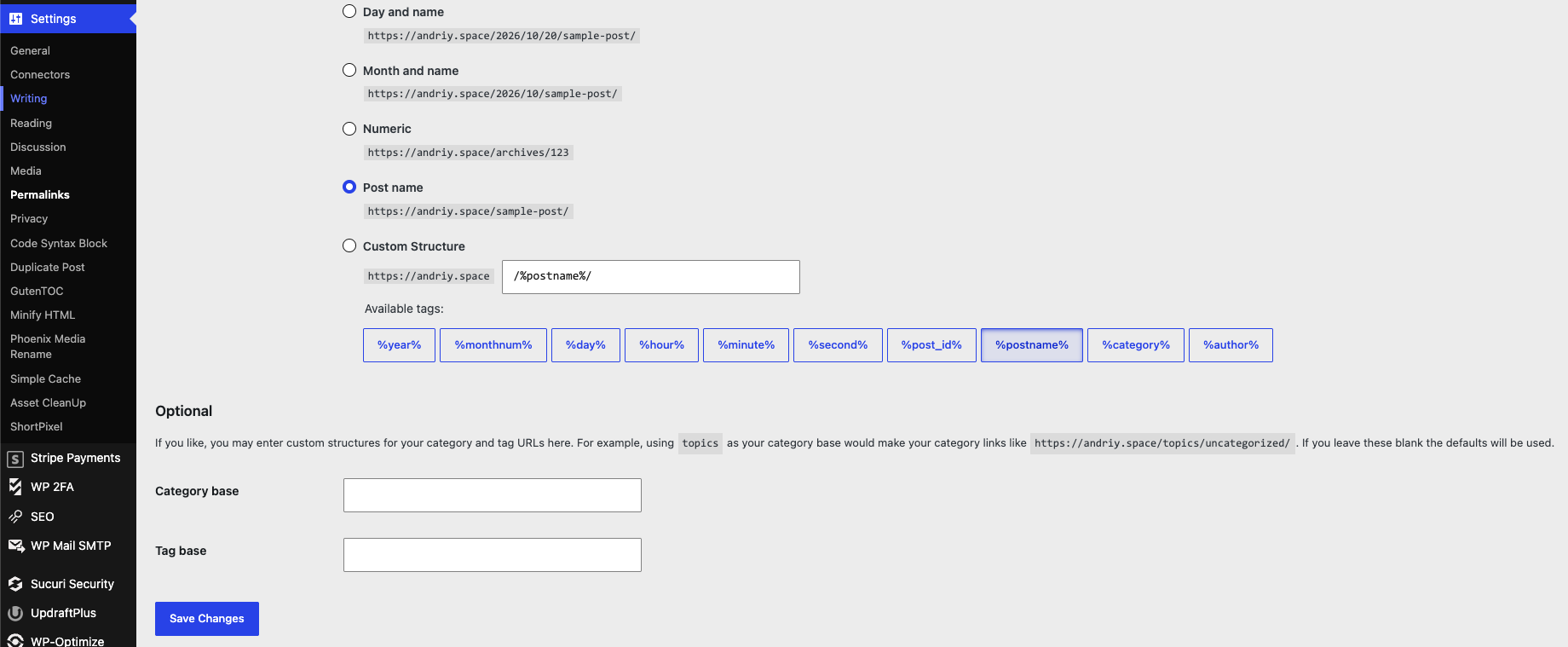
Tip: Stuck with a 404 after adding a route? Save the Permalinks screen once — WordPress regenerates its rewrite rules and your route starts resolving immediately.
Method 2: Load a Custom Template
Once the variables are in place, hook template_redirect to intercept the request and include your own template — from the theme if it exists, otherwise a fallback copy from your plugin:
<?php

function my_route_template() {
    $page = get_query_var('my_page');

    if ('pet-list' === $page) {
        $template = locate_template('archive-pet.php');

        if ($template) {
            load_template($template);
            exit;
        }
    }
}
add_action('template_redirect', 'my_route_template');
Inside the template, read get_query_var('pet_id') and render what you need. Because you exit before the default template loads, WordPress never runs its regular loop for this URL. If the request should 404 instead, call $wp_query->set_404() and status_header(404). The same technique powers how to create a custom search form in WordPress.
Method 3: Use a Router Plugin
If you prefer an API closer to Laravel, a router plugin registers routes with callbacks in a few lines. The classic example is WP Router:
<?php

function my_register_routes($router) {
    $router->add_route('pet-detail', array(
        'path' => 'pets/([0-9]+)',
        'access_callback' => true,
        'page_callback' => 'my_render_pet',
    ));
}
add_action('wp_router_generate_routes', 'my_register_routes');

function my_render_pet($pet_id) {
    load_template(get_template_directory() . '/single-pet.php', false, array('pet_id' => $pet_id));
    exit;
}
The plugin handles the rewrite plumbing, template selection, and 404 handling for you. WP Router itself has not been updated in years, so check the plugin directory for an actively maintained router before using one in production.
When to Use a Custom Post Type Instead
Sometimes what looks like a route is really structured content. If the URL will hold many records — /pets/fluffy, /pets/spot — register a custom post type with a rewrite slug instead:
<?php

register_post_type('pet', array(
    'public' => true,
    'rewrite' => array('slug' => 'pets'),
    'has_archive' => true,
));
You get URLs, archives, dedicated templates (single-pet.php, archive-pet.php), and admin editing for free. Reach for custom routes when the URL serves logic; a post type when it serves content.
FAQs About Creating Custom Routes in WordPress
Do I need to flush rewrite rules every time I add a route?
Only when the rules themselves change — adding a new add_rewrite_rule() or editing a regex. Saving Settings → Permalinks flushes them, so one flush after deploying is enough.
Can I create custom routes in WordPress without a plugin?
Yes. The first two methods use only core functions — add_rewrite_rule(), the query_vars filter, and template_redirect — added to functions.php or a small custom plugin.
Why does my custom route return a 404?
The usual culprits: rules not flushed, the variable not whitelisted through query_vars, or a regex that does not match the URL exactly. Also make sure permalinks are not set to Plain.
Should custom routes live in functions.php or a plugin?
A plugin. Routes tied to functionality — webhooks, endpoints, wizards — should survive theme changes. Keep functions.php for presentation code only.
Conclusion
Custom routes come down to one pattern: translate a URL into query variables with add_rewrite_rule(), then react to those variables with your own logic or template. For one-off paths, rewrite rules are all you need; for URLs holding growing collections of content, use a custom post type instead.
Need help building custom routes, endpoints, or integrations on your WordPress site? Hire an expert WordPress developer — or reach out to me directly and let’s talk about your project.

